₿ Bitcoin EMA Crossover Alert System — Automated TA Engine
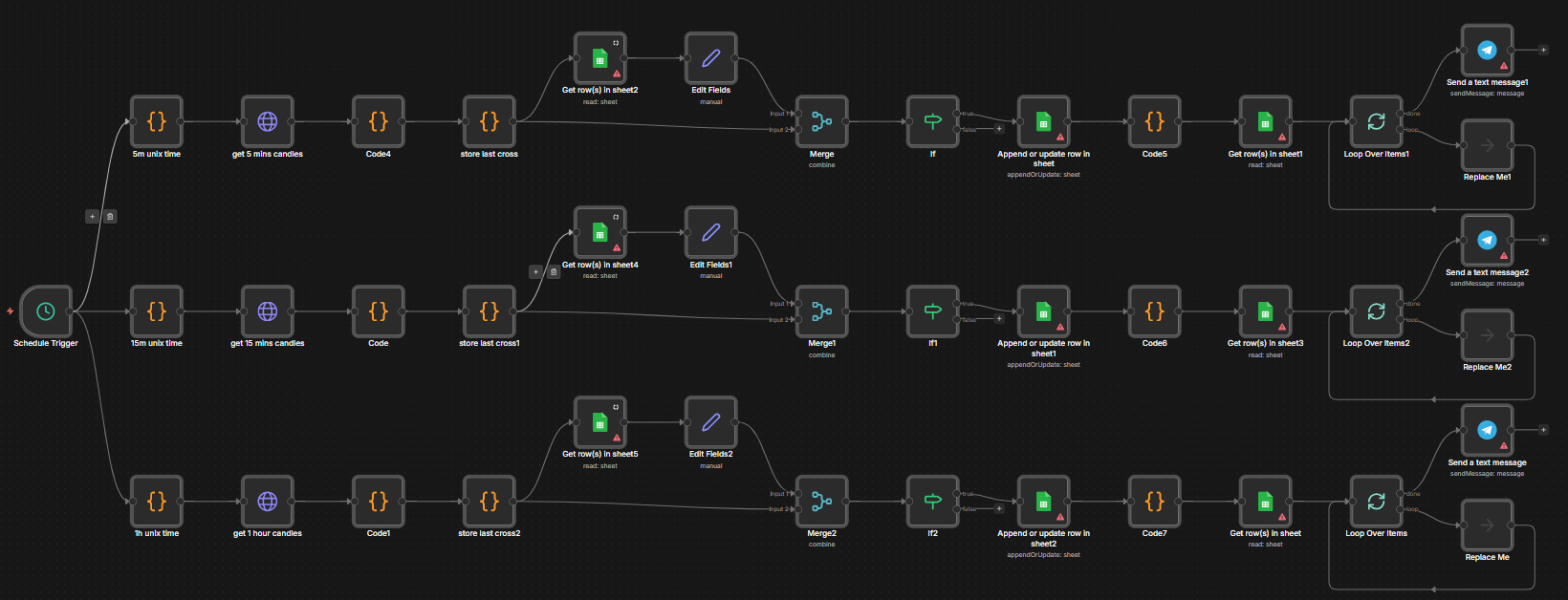
Bitcoin EMA Crossover Alert System is a sophisticated technical analysis engine built entirely within n8n. It automates the monitoring of Bitcoin price trends by calculating 9-period and 21-period Exponential Moving Averages (EMA). When a trend shift is detected via a crossover, the system manages the state, persists the data, and dispatches institutional-grade trading signals to subscribers.
This project demonstrates the capability of low-code automation to handle complex mathematical computations and persistent state management without a traditional backend.
🛠️ Technology Stack






✨ Features at a Glance
📈 Multi-Timeframe Technical Analysis
- On-the-Fly EMA Computation: Uses custom-coded JavaScript nodes to calculate EMA 9 and EMA 21 from raw candlestick JSON data, bypassing the need for expensive external indicator APIs.
- Precision Crossover Detection: Identifies Bullish (Golden Cross) and Bearish (Death Cross) signals with absolute accuracy across 5m, 15m, and 1h timeframes.
- Deduplication Logic: A sophisticated check-and-balance system that ensures only the first signal of a new trend is alerted, preventing notification fatigue.
💾 Persistent Signal State
- Serverless Database: Leverages Google Sheets as a high-availability state store.
- Historical Logging: Every signal is archived with price at execution, timestamp, and timeframe for future backtesting.
- Dynamic Subscriber Routing: Pulls recipient chat IDs in real-time from a “Subscribers” sheet, allowing for instant user onboarding.
🚀 High-Fidelity Notifications
- Rich Telegram Signals: Dispatches beautifully formatted messages including emojis, pair name (BTC/USDT), current price, and direction.
- Automated Retries: Built-in error handling for the Telegram Bot API to ensure signal delivery even during network congestion.
📁 Logic Flow (n8n Nodes)
bitcoin-workflow/
├── Cron Trigger         # Interval-based price fetching
├── API Connector        # Retrieves raw market OHLCV data
├── EMA Calculator [JS]  # Core mathematical engine (Code Node)
├── State Comparator     # Logic node checking Google Sheets
├── Signal Builder [JS]  # Formats the human-readable alert
└── Telegram Dispatcher  # Multi-cast signal delivery
🚀 Installation & Setup
1. Prerequisites
- n8n Instance (Desktop or Cloud)
- Telegram Bot API Token
- Google Sheets API Credentials
- Exchange API Support (Public OHLCV endpoints)
2. Workflow Import
- Download the
bitcoin-indicator.jsonfrom this repository. - In n8n, go to “Workflows” -> “Import from File”.
- Select the JSON file and import.
3. State Setup
- Create a Google Sheet with columns:
Timeframe,LastSignal,Timestamp,Price. - Update the Google Sheets nodes in n8n with your
Document ID. - Configure the Spreadsheet ID and range for the subscriber list.
4. Customization
- Adjust the Cron Trigger nodes to your preferred frequency (e.g., every 5 minutes).
- Edit the EMA Calculator node if you want to use different periods (e.g., 50/200).
📄 License
Distributed under the MIT License.
Designed & Developed by Aditya (aka aditya-2129)