📌 Pinterest Affiliate Marketing — Automated E-commerce Engine
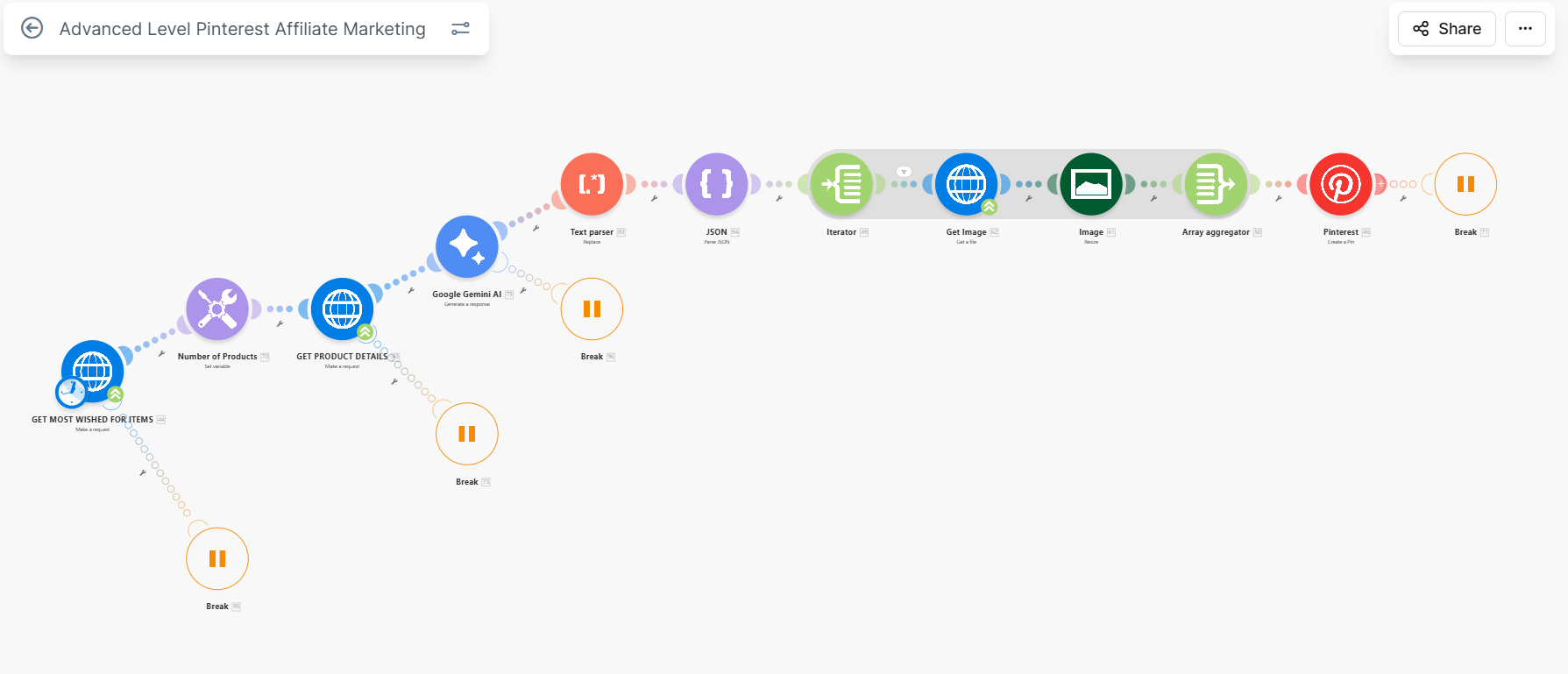
Pinterest Affiliate Marketing is a high-yield automation workflow engineered on Make.com. It transforms the manual grind of affiliate marketing into a seamless, 24/7 product discovery and publishing machine. By orchestrating interactions between the Amazon Data API, OpenAI’s GPT models, and Pinterest’s publishing engine, it ensures a constant presence in high-traffic niches with zero manual effort.
This architecture is optimized for conversion, leveraging AI for viral-ready titles, SEO-optimized descriptions, and intelligent product selection.
🛠️ Technology Stack






✨ Features at a Glance
🛒 Automated Product Sourcing
- Direct Amazon Integration: Uses the Real-Time Amazon Data API via RapidAPI to scrape the “Most Wished For” and Best-Seller lists.
- Dynamic Category Targeting: Specifically tuned for high-conversion categories like Smart Home, Electronics, and Kitchen Gadgets.
- Rich Metadata Extraction: Captures high-res images, pricing disparities (savings %), review counts, and star ratings to build social proof.
🧠 AI Content Studio
- GPT-4o Copywriting: Generates personality-driven Pin titles and descriptions that focus on solving user pain points rather than just listing features.
- SEO & Search Indexing: Automatically generates descriptive Alt Text and identifies dominant hex colors for the Pinterest visual search algorithm.
- Affiliate Link Localization: Automatically injects your Amazon Associate ID into every link, ensuring proper tracking and attribution.
⚡ Hands-Free Publishing
- Pinterest API Sync: Deploys pins directly to specified boards with the correct destination URL and media assets.
- Intelligent Error Handling: Built-in logic to handle API timeouts, rate limits (429s), and image formatting issues without stopping the workflow.
📁 Workflow Sequence (Make.com)
Workflow-Logic/
├── HTTP Module [GET]    # Fetches Amazon JSON data
├── JSON Parser          # Deserializes product records
├── Router               # Filters out low-rated or out-of-stock items
├── OpenAI GPT-4o        # Generates viral Pin copy & Alt Text
├── Image Optimizer      # Ensures images meet Pinterest aspect ratios
└── Pinterest Module     # Final Pin creation and logging
🚀 Installation & Setup
1. Prerequisites
- Make.com Account (Pro or Core recommended)
- OpenAI API Key
- RapidAPI Key (Real-Time Amazon Data API subscription)
- Pinterest Developer App (with
pins:writepermissions)
2. Workflow Import
- Download the
blueprint.jsonfrom this repository. - In Make.com, go to “Scenarios” -> “Create a new scenario”.
- Use the three-dot menu (…) to “Import Blueprint”.
3. API Connection
- Click on the OpenAI module and add your API Key.
- Click on the Pinterest module and authorize access via OAuth 2.0.
- Update the HTTP Request headers with your RapidAPI Key.
4. Scheduling
- Set the scenario to run on a schedule (e.g., once every 6 hours) to maintain a consistent posting frequency.
📄 License
This project is for educational purposes and portfolio demonstration.
Designed & Developed by Aditya (aka aditya-2129)